
So if you read the other two posts on topcodercloud.com
1.
The Second Edition of How to OpenCode to a Remote AI LLM Ollama Server
2.
How to AI Ollama Remotely as if It Were Local Using SSH
They explain how to server AI LLMs from a server, to a developer computer utilizing a SSH statement (a connector), then run opencode.
There were a few programs I had to build along the way that are proprietary programs that assist in the procedure from AI LLMs to, renaming the strings of each AI LLMs, and so forth.
Programs grow.
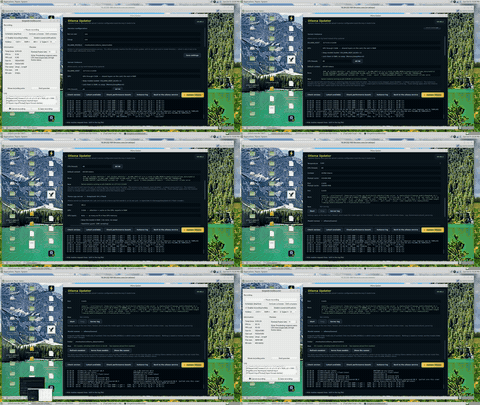
First program, I needed a way to update ollama with the click of a button, though restore my settings such as the location of my ai llms.
This program has grown in a nice way, what I mean by this, is that every time I need something, I then prompt it to add a area/section to the program that accommodates the change, though with consideration that this upgrade should be in this program.
First, its purpose is to update ollama.
Then, it is to apply performance improvement, change from service to server instance (for use with opencode), and configure a folder /path/to/ollama_data/models2 that format with json type symbolic links to that every ai llm model is in the format of ollama/[name of ai llm model]
it started as a gui for curl -fsSL https://ollama.com/install.sh | sh
This is a server-based program.
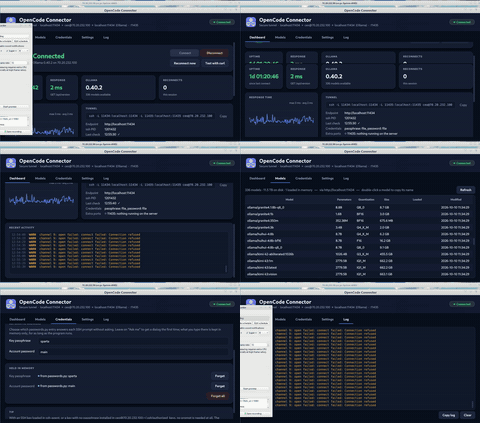
Second, I need a way to make the ssh connection from my server ai llm server to my development machine.
This is a client-based program.
A fancy connector for the following statement.
it started as a gui for ssh -L 11434:localhost:11434 -L 11435:localhost:11435 [username]@[ip address]
Third,
I use opencode with many ai models available via the ssh opencode connector to the server.
So simply tinker around with perhaps while the controlled statement I invoke on the paid versions of the ai llms are doing their thing.
You will want to keep with the 1.x version of opencode. The 2.0.26 and probably later are missing drastic features and to be avoided, for example can't copy/paste, and so forth.
0 Comments
No comments yet. Be the first!
Leave a Comment